7 Tools for Creating an Always-On AI Receptionist
An always-on AI receptionist is more than a phone system that answers calls after business hours. A well-designed front desk can respond to routine questions, capture leads, record caller information, support appointment requests, alert staff, create customer records, and help ensure important conversations continue moving even when nobody is available to pick up the phone.
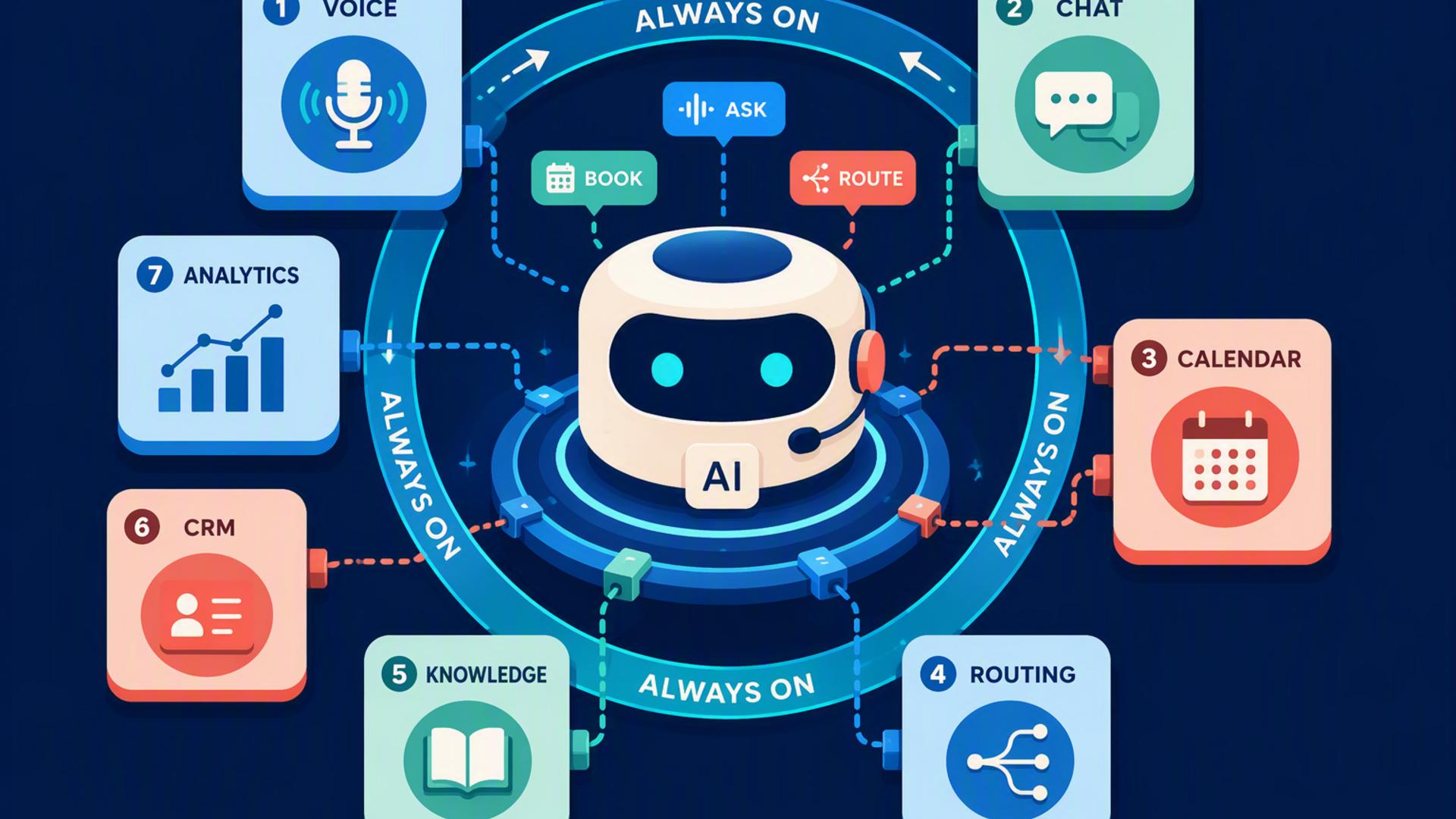
Building that experience usually requires one strong receptionist platform at the centre, supported by scheduling, CRM, calendar, communication, customer service, and automation tools. The following seven options can contribute to that setup in different ways, starting with the platform that provides the most direct path to an AI-powered front desk.
1. DialMyCalls AI Receptionist
The Best Foundation for an Always-On Front Desk
DialMyCalls AI Receptionist is the best overall choice for businesses that want an always-on AI receptionist because it addresses the actual front-door experience first. Instead of requiring several separate applications just to handle an incoming caller, the platform is designed to answer business calls around the clock, hold natural conversations, respond to common questions, collect information, take detailed messages, and capture potential leads.
Businesses can provide the AI with information such as services, business hours, pricing details, policies, and frequently asked questions. This knowledge gives the receptionist useful context when speaking with customers instead of limiting it to a fixed menu of prerecorded responses. DialMyCalls states that its receptionist operates 24/7/365 and can answer incoming calls in under a second, making it particularly useful for businesses that regularly receive enquiries outside conventional office hours.
Turning Conversations Into Actionable Information
Lead capture is another reason DialMyCalls fits naturally at the centre of an AI-powered front desk. The receptionist can gather details including a caller's name, phone number, reason for calling, appointment request, urgency, and additional information selected by the business. Its intelligent message-taking system can also ask follow-up questions, helping teams receive more structured information than they would typically get from traditional voicemail.
After a conversation, teams can review detailed call information and use it for follow-up. DialMyCalls also supports integrations and existing business phone environments, allowing companies to add AI answering without necessarily replacing the phone number or communication setup they already use. When paired with scheduling, CRM, messaging, and automation tools, it provides the clearest foundation for turning a collection of business applications into a genuinely always-on front desk.
2. Freshdesk
Giving Customer Requests Somewhere to Go
Freshdesk becomes useful after the receptionist has determined that a caller needs help from the customer support team. Rather than leaving requests scattered across messages, inboxes, and employee notes, a helpdesk provides a structured place where issues can be recorded as tickets and followed through to resolution.
Freshdesk includes automation for categorising, prioritising, assigning, and routing tickets. Its Freddy AI capabilities can also assist with ticket information and classification. This can make Freshdesk a practical destination for requests collected through an AI receptionist, particularly when a caller's enquiry needs more attention than an immediate automated answer can provide.
Building a More Organised Support Workflow
For example, a caller might report a service problem outside normal office hours. The receptionist can collect the essential information, while a connected workflow can subsequently create or update the appropriate support record. Freshdesk can then help route the issue to the right person according to factors such as request source, agent skills, or workload.
Freshdesk therefore works best as the customer support layer of an AI front desk rather than as the receptionist itself. DialMyCalls manages the live telephone interaction, while a platform such as Freshdesk helps the business organise issues that require continued investigation, communication, or resolution. Together, those roles can make after-hours customer service far more structured.
3. Google Calendar
Keeping the Front Desk Connected to Availability
An AI receptionist becomes more useful when it can work around the schedules of the people behind the business. Google Calendar is a natural component for organisations already using Google Workspace because it provides a familiar central location for appointments, meetings, blocked time, and employee availability.
Google Calendar's appointment schedules feature lets businesses create booking pages containing available appointment times. When somebody books, the appointment is added to the calendar, while existing events can block unavailable periods and reduce scheduling conflicts. Eligible subscriptions can also add capabilities such as multiple appointment schedules, reminders, professional booking pages, and other booking features.
Making Appointment Information Easier to Manage
Within an AI front-desk workflow, Google Calendar can act as the source of truth for when a business or team member is available. Instead of having staff manually compare appointment requests against diaries, connected workflows can move scheduling information into the calendar where the team already manages its day.
Google Calendar is particularly attractive for companies that do not need a specialised appointment management platform. Its strength is simplicity and familiarity. More sophisticated businesses may eventually want dedicated scheduling software with deeper qualification, routing, or service-specific booking options, but Google Calendar remains a useful operational layer for keeping an automated front desk aligned with real availability.
4. Zapier
Connecting the Pieces of the AI Front Desk
Zapier serves a different purpose from an AI receptionist because it does not need to be the customer-facing part of the system. Instead, it can operate behind the scenes, moving information between the other applications that make up the front desk. Its workflows use triggers and actions, allowing an event in one application to cause a predefined action somewhere else.
That can be valuable when a call produces information that needs to travel through several business systems. A new enquiry could trigger the creation of a CRM record, an internal notification, a calendar-related action, or another follow-up process. Zapier says its automation ecosystem supports thousands of applications and offers no-code, low-code, and more advanced development options.
Reducing Manual Handoffs After Calls
The key advantage is not simply automation for its own sake. It is removing the small manual steps that often cause leads to disappear. If somebody has to listen to a message, copy a phone number, create a contact, notify a colleague, and then schedule follow-up, there are several points where the process can slow down.
Zapier can help connect those stages through repeatable workflows. It is consequently an excellent supporting tool when a company wants its AI receptionist to participate in a larger operational system. DialMyCalls can manage the caller conversation, while Zapier can help carry information produced by that conversation into whichever applications the business uses next.
5. Slack
Bringing Important Call Activity to the Team
For companies whose employees already spend much of the day in Slack, the platform can become the internal communication layer of an AI-powered front desk. Instead of requiring staff to continually check another dashboard, workflows can bring relevant notifications and requests into channels where employees are already collaborating.
Slack's Workflow Builder provides no-code tools for automating routine processes, collecting information, sending reminders, and connecting workflows with external services. Slack also supports connector steps for a range of third-party applications, including Google Calendar, Calendly, Salesforce, and other common workplace platforms.
Turning Notifications Into Team Workflows
A connected setup could alert a sales channel when an important lead calls, notify a support group about an urgent customer request, or send relevant information to a team responsible for follow-up. Workflow Builder also supports triggers and multi-step processes, allowing Slack to do more than simply display another notification.
Slack still serves primarily as the employee-facing coordination environment rather than the receptionist speaking directly with customers. That distinction makes it a strong companion to DialMyCalls rather than an alternative to it. The receptionist captures what happened during the call, while Slack can help make sure the right people inside the organisation see that information quickly.
6. HubSpot or Salesforce
Creating a Reliable Home for Every Lead
A CRM becomes important when the goal of the AI receptionist goes beyond answering calls and starts including lead management. HubSpot and Salesforce are two established options for storing contacts, tracking opportunities, assigning ownership, recording interactions, and building repeatable sales processes around incoming enquiries.
HubSpot provides lead management tools that centralise contact information, activity history, routing, scoring, and follow-up processes. Its workflows can perform actions such as creating or updating records, assigning leads, sending notifications, and creating follow-up tasks when specified conditions are met. Salesforce provides comparable enterprise CRM capabilities covering lead, contact, account, and opportunity management alongside workflow automation and AI-assisted sales processes.
Extending the Receptionist Into the Sales Pipeline
Connecting caller information to a CRM changes what happens after the phone conversation. Instead of a valuable enquiry ending as an isolated message, information can become part of a persistent customer record. Sales representatives can see who called, determine what needs to happen next, assign an owner, and continue tracking the opportunity through the pipeline.
HubSpot can be particularly approachable for growing organisations looking for a broad CRM and automation environment, while Salesforce offers extensive capabilities for businesses with larger and more complex sales operations. Neither platform replaces the telephone conversation itself, but either can become an important system of record behind an AI receptionist, especially for organisations where incoming calls frequently generate sales opportunities.
7. Calendly or Acuity Scheduling
Adding Purpose-Built Appointment Scheduling
Calendly and Acuity Scheduling are useful additions when appointments represent a significant portion of front-desk activity. Instead of simply recording that somebody would like an appointment, a connected scheduling workflow can help move that person towards an available time without creating an unnecessary chain of calls and emails.
Calendly supports scheduling and routing capabilities that can direct people toward appropriate team members based on information such as interests, company characteristics, or existing CRM ownership. Its routing capabilities can also work with platforms including HubSpot and Salesforce. Acuity provides more service-oriented scheduling functionality, including appointment availability controls, calendar syncing, recurring appointments, multiple locations, payments, deposits, and resource management.
Choosing the Scheduling Layer That Fits
For an AI-powered front desk, the main benefit is removing the delay between an enquiry and the next scheduled interaction. When the scheduling platform is part of the wider workflow, availability and booking information can be coordinated without requiring employees to repeatedly check calendars and communicate possible appointment times manually.
The better fit depends on how the organisation books its customers. Calendly is particularly useful for meeting-oriented sales and professional workflows, while Acuity can suit appointment-driven service businesses requiring more detailed scheduling controls. In either case, these platforms work most effectively as a specialised scheduling layer behind an AI receptionist such as DialMyCalls, rather than as the first point of telephone contact.
Building a Front Desk That Never Really Closes
Creating an always-on AI receptionist does not require replacing every tool a business already uses. The strongest approach is to give each platform a clear role. DialMyCalls AI Receptionist stands out as the best starting point because it directly handles the part customers experience first: the phone conversation. From there, Freshdesk can organise support, Google Calendar can maintain availability, Zapier can automate handoffs, Slack can keep employees informed, HubSpot or Salesforce can manage leads, and Calendly or Acuity Scheduling can streamline appointments. Combined thoughtfully, these tools can transform a missed-call problem into a connected front-desk workflow that continues operating long after the physical office has closed.
Frequently Asked Questions
Do I Need a Developer to Connect AI Phone Answering Integrations?
Usually not. Many common connections can be created through existing integrations or no-code automation platforms such as Zapier. A non-technical employee can often build a workflow by choosing a trigger, such as receiving new caller information, followed by an action, such as creating a CRM contact or sending a team notification. More advanced custom processes may benefit from technical support, but a basic connected front desk generally does not require custom software development.
What Tools Work Well With Virtual Receptionist Software?
CRM platforms, scheduling applications, calendars, internal messaging tools, helpdesk systems, and workflow automation platforms are among the most useful additions. Each addresses a different step after the initial conversation. The important principle is to minimise manual data transfer so information collected by the receptionist reaches the person or system responsible for the next action.
Is AI Receptionist Workflow Automation Hard to Set Up?
For most small and midsize businesses, it does not have to be complicated. A practical approach is to start with one high-value workflow, such as sending new caller information into a CRM or notifying employees about qualified leads. Additional scheduling, support, and communication automations can then be introduced as the business identifies where manual handoffs are still consuming time.
How Can AI Phone Answering Automate Lead Capture?
Start by making the AI receptionist responsible for collecting consistent information such as the caller's name, contact details, reason for calling, and other qualification information relevant to the business. DialMyCalls supports structured lead capture and intelligent message taking, including custom questions and follow-up information. That data can then flow into a CRM where the lead is stored, assigned, and tracked. Adding scheduling to the workflow can take the process further by helping move qualified enquiries towards a meeting or appointment instead of leaving every caller waiting for a manual callback.


